You don't need CI to deploy a static website
I had a rare surplus of energy this past week and I decided to divert it towards seeing if there was any maintenance that needed to be done on my public projects. This ended up with me blowing the cobwebs off {catchup}, an R package I use all the time in my personal workflow but rarely hack on. I realised that the package might have a bit more appeal to somebody other than me if it had a nice-to-look-at documentation website rather than just the README of a rarely updated source repo.
A day or two later, after a bit of reading and some trial and error, I had managed to deploy the site at my own domain.
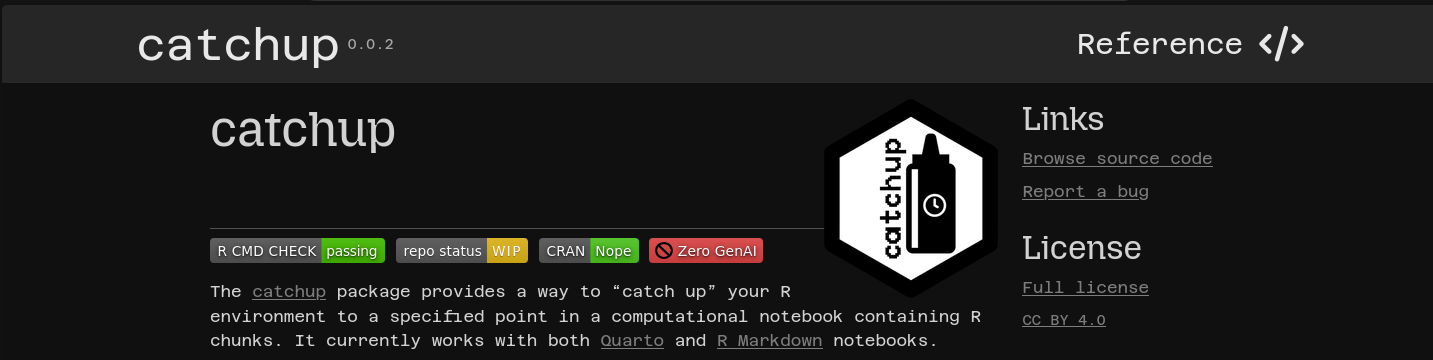
And the best part is that it used no GitHub and no CI.
I was so won over by how much better the setup was than the one I had been using for my main website (i.e. this one) for years, that I swiftly switched it over to the same deployment system.
This post might be a bit of a departure from what I usually write about because it's not as focused on data and research. But I think there are a lot of people like me with no software development background, who have ended up in the world of programming and version control and code hosting repositories mostly to support their research activities. Maybe this post will be helpful in providing an example of a pretty easy alternative to the vast amount of material assuming you're happy to adopt a setup based on GitHub and/or CI.
Why drop CI?
I don't think I need to rehearse the reasons why you would want to avoid GitHub at this point - you either get it or you don't. But it might be less obvious why I'm apparently lumping CI into the same category, so I guess I should expand on that.
The main issue with CI is that it's resource-intensive. That's not as much of a problem for big software projects, where the cost is worth it to ensure that the test suite or the build pipeline is being run at certain points in the development process. But tools like GitHub Actions have abstracted away the costs and realities of CI to the extent that it is overused on even tiny projects, a practice which has been super normalised in the data science world.
It's not that CI is inherently bad, it's just not always the approriate tool for the job in my opinion, regardless of how frictionless it is.
CI and static site generators
Let's use static site generators (SSGs) as our example. Typically, for a website built with an SSG, you have a source directory that follows a set structure, containing the theme, templates, configuration files and content for the website. It might look something like this:
content/
static/
templates/
theme/
config.toml
Then you run the SSG program's build command from the root of that directory to generate a new directory containing the static website files, which is what will actually be served:
build/ (<- new, contains the static site)
content/
static/
templates/
theme/
config.toml
There are a few different options for how you could deploy the site.
The simplest version doesn't involve any version control at all - you can just take that the contents of that build/ directory and drop them anywhere that offers web hosting.
But the two main options I want to consider are the following:
- Option 1: Put the source files in version control, and build the site via CI. (Generally, this will then integrate with something like Netlify or GitHub Pages to serve the built site.)
- Option 2: Put both the source files and the locally built site in version control. You can use webhooks to serve the built site, updating on each push event.
In the first option, you don't build the site locally, you set up a CI workflow that builds the site whenever you push the source. So, every time you make a public-facing change to the website, you spin up a virtual machine just to run a simple build command that would take about a second to run on your laptop (where you're already working on the source files), and then throw that machine away. Is this necessary? This seems like using a chainsaw to open a can of beans to me.
Option 2 gets to exactly the same end state, without any of the pointless waste. It's also more portable and less tied to specific platforms and services. I think it makes way more sense, but it's much less well documented.
For example, I built the {catchup} website with {pkgdown}, which is a really fantastic package. However, {pkgdown} only really targets a GitHub Actions-based workflow for deployment of the websites it produces, and it makes very little effort to explain other strategies for getting your website online.
I guess that's part of the gap that I'm trying to close here by writing up what I did and why I find it so much more sensible. To explain that, there's two parts to the setup that need to be outlined: git-pages, and git worktrees.
Deploying via git-pages with Codeberg
The first tool that really helps make this easy is git-pages, a relatively new tool that has been developed to underpin Codeberg's Pages functionality. It's a git-based static site server - it takes a repo and serves a website from it. It provides the basis for forges like Codeberg to offer something like what GitHub Pages can offer - a way of saying "if you have your static site files in a repo hosted here, we have a way of serving the site over the web".
I won't go too much into the details of how to set up a repo to take advantage of it because honestly I just followed the excellent documentation.
The important point to note here is that Codeberg's implementation expects that, for a repository-based website, your site files live in the root of a branch called pages.
So, if you recall the example directory strucure from earlier, that would mean taking everything inside build/, .gitignore-ing it, and checking it out at a separate branch pages, while the source continues to be in a separate branch (e.g. main).
There are various ways to arrive at this situation, but the one that makes this whole process a breeze is git worktrees, which I'll get to in a second.
Once you have the site files in your public pages branch, you can set up a Forgejo webhook following the instructions in the Codeberg docs that will re-serve your site every time there is a new push event to the branch.
How git worktrees help
Perhaps you're already using git worktrees, but I'll admit that I hadn't yet found a use for them until discovering how perfectly they suit this branch-based deployment setup.
Git worktrees allow you to have a subdirectory within a repository act like a checked out branch of the repository, so that when you navigate to the subdirectory you checkout that branch.
This is the perfect mechanism for declaring that the build/ subdirectory of the repo should map to the pages branch, as this post points out.
When the SSG builds the static site directory, it puts the files where they need to be - in the root of the pages branch.
One thing to be careful of: the way that git keeps track of the worktree is via a .git file in the subdirectory, and some static site generators completely delete and rebuild the subdirectory each time they call their build command. In that case, you need to temporarily move the .git file somewhere safe and put it back in place after and everything will work fine. Thankfully, my SSG of choice, Zola has a configuration option to preserve dotfiles in the build directory precisely for this use case.
So, if your webhook and your worktree are set up correctly, after updating your website's source, you can deploy your website changes just by doing something like the following:
myfavssg build
cd build
git add -A
git commit -m "fix typos in latest post"
git push -u origin pages
And the site will be updated.
To sum up
Whether it's a {pkgdown} site, or a site built by something like Zola or Hugo - if it generates a subdirectory with static site files, you can set it up as a worktree and point it to a pages branch that gets served via a webhook with Codeberg Pages.
Switching this site to use that deployment system meant I no longer had any ties to Netlify, and I could take back my DNS management from them for my domain, which is a bonus. It also enabled me to reach repository zero on GitHub.
Let me know if there's anything I've not been clear on here, or if you have any other tips on how to make this kind of thing work smoothly that I might have missed.